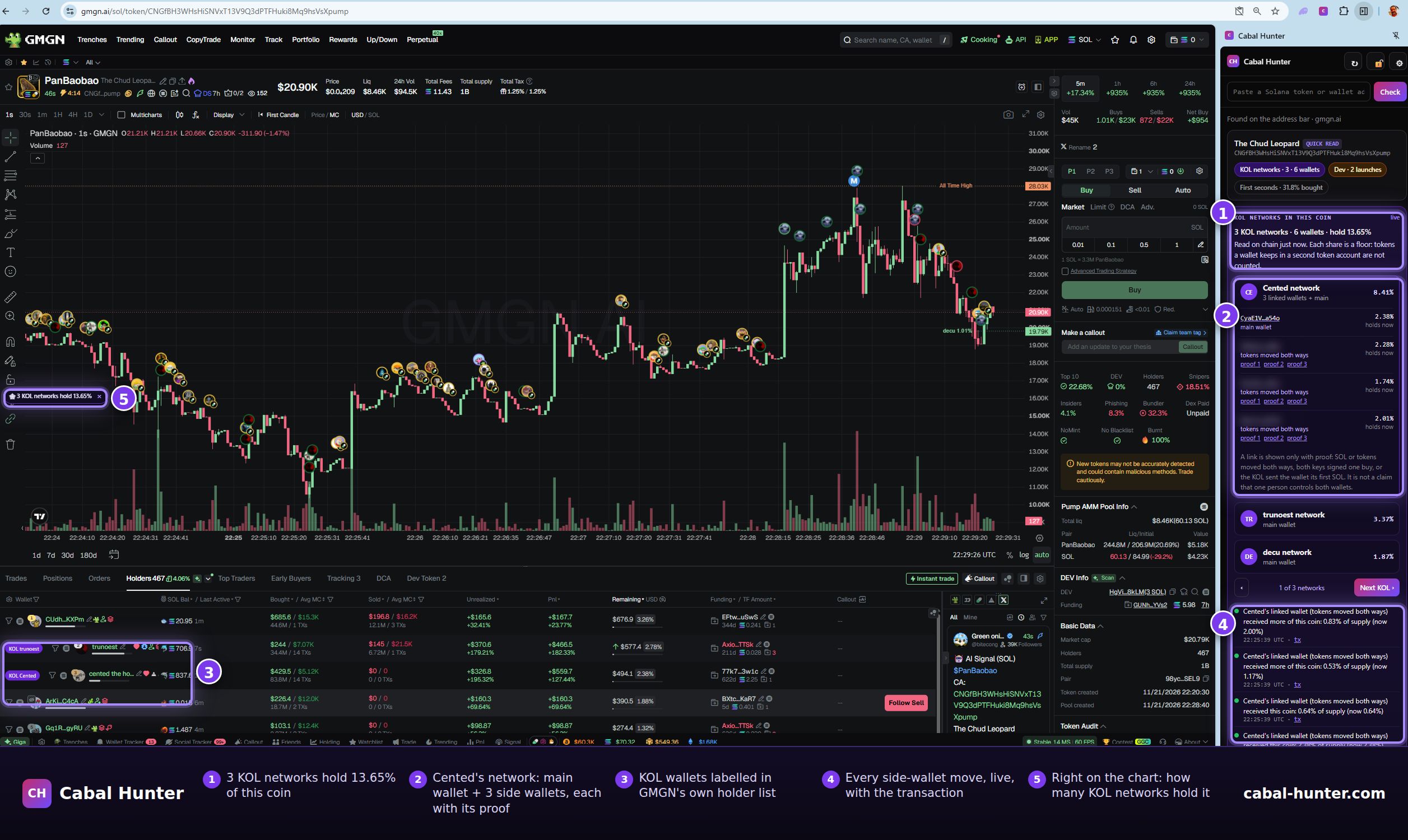
What it is
Cabal Hunter keeps a list of 461 KOLs and 3,799 wallets linked to them. A wallet is only linked when the chain proves it: money moved both ways between the two, both signed the same buy, or the KOL funded the wallet's first SOL. The extension opens in Chrome's side panel next to your trading terminal and reads the coin from the tab you have open. Nothing to paste, no wallet to connect.
What you see, part by part
1. The KOL networks in this coin
The moment you open a coin, the panel reads every wallet on our list from the chain and shows how many KOL networks hold it, how many of their wallets, and what share of the supply they hold between them. In the screen above: 3 KOL networks, 6 wallets, 13.65% of the supply.
2. Each network opened, with its proof
Open a network and you get the KOL's main wallet and every side wallet in it, with what each holds now and the reason it is linked: "tokens moved both ways", "SOL moved both ways", "signed the same buy" or "funded by the KOL". Every link has its proof transactions next to it; click one and it opens on Solscan, so you can check it yourself.
3. On the terminal's own lists
On Axiom and GMGN, KOL wallets and their linked wallets are tagged where the page lists its traders and holders, so you see them without looking away from the chart. One click loads a KOL's whole network into the terminal's own wallet tracker, and from then on it shows on the terminal's chart too.
4. Every buy and sell, live
While the coin is open, every wallet in those networks is watched. A buy, a sale or a transfer shows in the panel within seconds, with the share of supply and its transaction. A KOL that enters the coin after you opened it shows up too. If you allow it, each one also arrives as a desktop alert.
The words are exact on purpose: when a wallet's tokens arrive with no money going the other way (a transfer, or a token it created itself), the feed says "received", never "bought".
5. Right on the chart
A small pill on the terminal's page shows how many KOL networks hold the coin, and the extension's toolbar icon shows the count even with the panel closed.
Also in the panel
- New coins: on Axiom's Pulse feed, each coin carries a short label: how many coins its creator has launched, and whether a KOL network created it or bought in its first seconds.
- Check any wallet: paste a wallet to see whether it is a KOL's main wallet or a linked wallet, or have it checked for linked wallets of its own.
- The dev and the first seconds: the creator's launch record, who funded the creator, and every wallet that bought in the coin's first seconds. Contract traps (transfer fees, live freeze or mint authority, no sell route) come first.
How a link is proven
Three things count, and nothing else: money moved both ways between the KOL and the wallet, both signed the same buy, or the KOL sent the wallet its first SOL. Buying the same coin at the same time never counts, and neither does a one-way payment. We also audit our own list: on 21 November we removed 131 links that did not hold up (exchange deposit addresses, giveaway payouts and links to other named people). The method and every number are in How to find a KOL's side wallets, and prove the link.
A link shows that money moved or a transaction was signed. It is never a claim that one person controls both wallets.
What is free and what is not
| Free key | KOL plan | |
|---|---|---|
| KOL networks in a coin: how many, how much | Yes | Yes |
| KOL main wallets by name, and their live buys and sells | Yes | Yes |
| Which KOL each side wallet belongs to, with its proof | Counted only | Yes |
| Live alerts for side wallets | As "a KOL-network wallet" | Named |
| Labels on Axiom and GMGN | Main wallets | Main and linked |
| Load a network into your terminal, wallet checks | — | Yes |
A free key is just an email and also gives 250 scans a month. The KOL plan is $49 a month by card (or $49 in SOL for 30 days, or a 7-day KOL week for $12.25 in SOL), Pro at $99 includes it, and every account can try the KOL plan free for 7 days, once.
Set it up in a minute
- Add Cabal Hunter from the Chrome Web Store and pin it from the puzzle-piece icon.
- Open any Solana coin on your terminal. The panel reads it from the tab.
- Paste your key in the panel (or get a free one with just an email). If you already use cabal-hunter.com in this browser, it picks up your key by itself.
- Press "Start your free week" in the panel to see every side wallet with its proof for 7 days.
It works on Chrome on a computer. On a phone, our Telegram bot @TheCabalHunter_Bot scans any coin.
A KOL you follow is missing?
Send us their wallet with the form on the extension page
or /addkol in our Telegram bot. We check it on chain; once it is confirmed as a KOL, its whole history is read
for side wallets at the next run, and we tell you when it is listed.
What it is not
- Not advice. It shows what the chain recorded. It never tells you to buy or sell.
- Not a safety rating. A coin with no KOL network in it is not a safe coin.
- Not a claim about people. A link is evidence of money or a shared signature, not of who controls a wallet.